
An AI agent that serves your customers and works inside your system
On your site, on WhatsApp or by voice with a face that reacts in real time, it answers from what your company knows. Inside your system it runs actions and handles the events of your application. Plug it into your AI agents (Claude, ChatGPT, Copilot…).
- Visitor Do you have the blue backpack in size M?
- Action in your system: checking inventory
stock_lookup - Agent Yes, 3 left. Want me to hold one for pickup today?
- Visitor Yes, under the name Lucia.
- Action in your system: creating the hold
hold_create - Agent Done, your backpack is held until 7 pm.
The essentials at a glance
Outside: serve customers where they are
The same agent, with the same knowledge, serves people on whichever channel they use. The light on each row tells you what to expect today.
- Available
- With conditions
-
Web widget
A code snippet on your page opens the chat. You choose allowed domains, the usage limit per visitor, the button size and its logo.
Available
-
Voice with an avatar
Voice notes up to 120 seconds and live calls with a face that reacts as it listens, thinks and talks. It answers in your page language.
With conditions The platform needs voice configured and your page needs HTTPS
-
WhatsApp
Connect a WhatsApp Cloud API number to an agent. It receives and answers text messages; images and audio are not processed.
Available Text only
-
Gmail
Connect a Google account. The agent replies in the same email thread.
With conditions Recent improvements are rolling out: confirm when you enable it
Inside: it acts within your system
Besides chatting, the agent works in your application, always within the permissions of the person asking.
- Runs actions of your app
- It checks inventory, creates a hold or logs a request. You choose which actions it can use: it only sees the ones you assigned.
- Handles events of your app
- When your application or an automation gives it a job, the agent runs it in the background and records the result. With conditions: it depends on how your environment is set up.
- Acts on your page
- In the chat it takes the visitor to a section, highlights an element or proposes a button; the visitor always confirms. By voice, coming soon.
- Plugged into your AI agents
- Plug it into your personal agents (Claude, ChatGPT, Copilot…) to set it up and use it where you already work.
How an agent is built
Three steps, in this order.
-
Create the profile
Name, area, instructions and your company knowledge: up to 20,000 characters each. Note the domains where it will serve.
-
Connect it to your system
Register the connection to your service and choose the actions it can run. The agent only sees the ones you assigned and the caller may use.
-
Paste the code on your site
Copy the snippet from the agent list. Load it once per page.
<script
  src="https://cdn.ovenfo.com/agent.js"
  data-agent-key="agk_live_xxxxxxxxxxxxxxxx"
  data-lang="en"
  defer>
</script>
Change "en" to "es" if your page is in Spanish: it also sets the voice language.
The button, your way
Three sizes, six logos and light or dark colour palettes that follow your site mode.
The Office: your agents at a glance
It is the home screen of the module. It groups agents by area, shows their state with lights and ranks alerts by priority. It refreshes itself every 15 seconds.
Sales
- Web store Active
- Quotes Busy
Support
- General help Active
- Support mailbox Needs attention
- After-sales Active
Operations
- Inventory Busy
- Active
- Busy
- Needs attention
Example Names and states are examples. One real alert: a Gmail mailbox sync that fails shows up in the Office.
Inside the product
Real captures of the AI Agent administration, with fictional data.
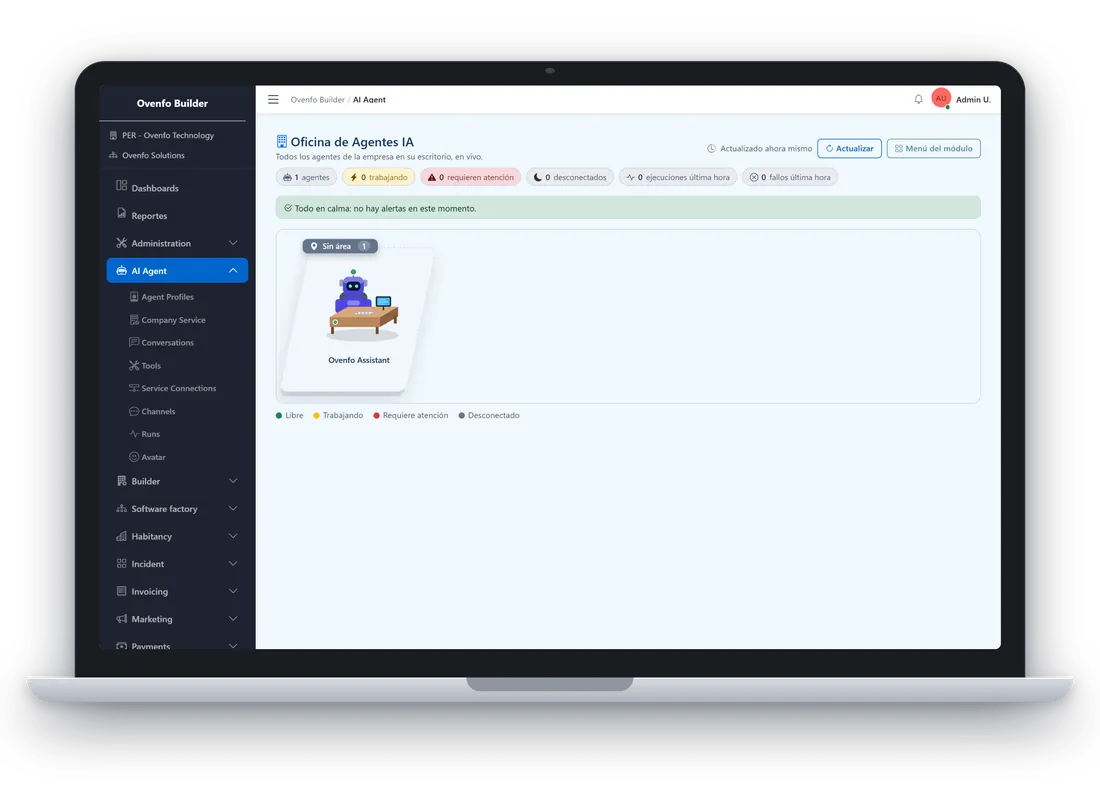
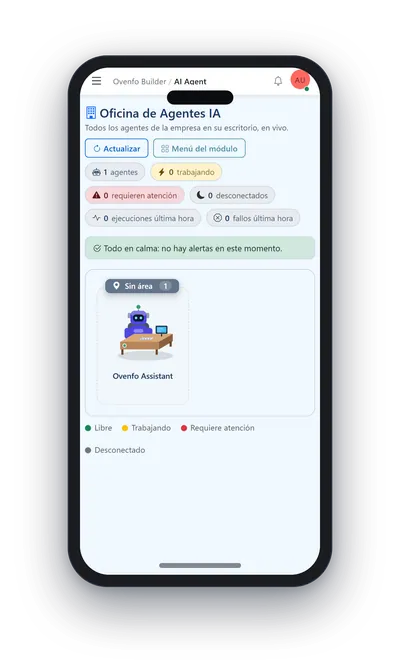
Demo data The interface is shown in Spanish.
Download brochure (PDF) · PDF, in Spanish, 0.8 MB
Voice and avatar, with clear rules
Talking to an agent should not be a risk. Calls have limits, the agent keeps its tone, and actions that change data are confirmed out loud.
- A face that reacts
- In live calls the avatar listens, thinks and talks with your customer in real time, with the look you configure.
- Calls with limits
- A call lasts 10 minutes at most. After 45 seconds of silence the agent asks if you are still there, and every call ends with a spoken goodbye.
- Guardrails and tone
- Rules on respectful language, harmful content and privacy apply to every answer, with a tone control from very formal to relaxed.
- Spoken confirmation
- Actions that change data are marked and the agent asks for confirmation before running them.
Coming soon, on the roadmap
Voice and conversation improvements in development. Not available yet; they will be switched on per agent, and the voice ones arrive first on desktop.
- Walkie-talkie voice Coming soon
- Hold a button to talk and release to send: background noise no longer cuts or interrupts the agent.
- Smartwatch-style minimised bubble Coming soon
- Keep talking to the agent in a small bubble while you browse your page.
- Voice that acts on the page Coming soon
- Say "take me to pricing" and the agent takes you there. Anything that changes data you confirm on the page.
- Conversation across pages Coming soon
- You change page and the conversation continues, with a short cut of a few seconds.
- Contact capture with consent Coming soon
- The agent asks for your name and your phone or email only after your visible consent, and leaves them to your sales team.
- Microphone permission step Coming soon
- Before talking, a screen explains and guides you to turn on microphone and audio.
Frequently asked questions
What do I need to put it on my site?
An Ovenfo account, an agent profile and a code snippet pasted into your pages. Nothing is installed on your server. If your site restricts which scripts it can load, it must allow the agent one.
Does the agent only answer, or does it do things?
Both. It answers from your company instructions and knowledge, and it runs actions of your system, such as checking an inventory or creating a record, always within the permissions of the person asking.
Does it serve both outside and inside my system?
Yes. Outside, it serves your customers on your site, on WhatsApp and by voice with an avatar. Inside, it runs actions of your application and handles the events you assign. The Ovenfo AI Agent comes inside every Ovenfo product.
Can I use it from my AI agents?
Yes. You can plug it into your personal agents (Claude, ChatGPT, Copilot…) to set it up and use it where you already work.
Which voice improvements are coming?
On the roadmap, not available yet: walkie-talkie voice to avoid noise cuts, a minimised bubble, voice that acts on the page, a conversation that continues across pages, contact capture with consent and a microphone permission step.
Who can use my agent?
The agent public key can be published. What protects it is the allowed-domains list and the per-minute usage limit. An empty list allows any domain, so fill it in.
Does it work in my language?
The chat answers in the language of the visitor first message. The interface and voice use Spanish or English, according to your page language.
How much does it cost?
This page does not publish agent prices. Write to social@ovenfo.com and we will reply.
Create your first agent
Open the module, create the profile and copy the code. If you would rather talk first, write to us.